

Pocket Option
Hands-free signal execution around the clock on OTC markets, with every strategy, guard and money-management mode.
- Automated, gated execution
- Pair and timeframe kept in sync with the chart
- Risk and money management built in
 Windows 10 & 11
5-day free trial
Pocket Option trading.
Windows 10 & 11
5-day free trial
Pocket Option trading.21 strategy engines read every candle. A signal gate checks score, payout and timing before anything is placed. Money management you set, on your own Windows PC and your own broker account.
No card for the trial · Practice account first · One license, one computer
APEX EDGE PRO drives a real Pocket Option browser session on your computer: your account, your settings, your money.
Hands-free signal execution around the clock on OTC markets, with every strategy, guard and money-management mode.

Support for IQ Option is on the roadmap. It is not part of the app today, and no plan is sold on the promise of it.
Install the real APEX EDGE PRO engine, connect your own Pocket Option account and watch it evaluate and place eligible trades for 5 days. No card required. It shows you what happened, wins and losses alike; it never promises profit.
Windows 10 or 11 (64-bit) · about 5 minutes to set up · one computer
The trial runs the real engine with its limits stated up front, so nothing locked ever pretends to be on.
The trial trades the 15-minute profile in Fast or Normal signal mode.
All strategies contribute in combination mode. Choosing strategies one by one is part of a plan.
Pick any available OTC pair. Regular currencies, crypto, stocks and commodities stay visible, marked for the full version.
Before a real-money trade it stops, checks the account and balance against your recovery ladder, and waits for you to arm it again.
A plan unlocks the full dashboard: each strategy under your control, configuration history, execution evidence, APEX AI context, every money-management mode and detailed earnings. The first view is a real screenshot of the trial; the other two are design concepts of the full dashboard, and say so.
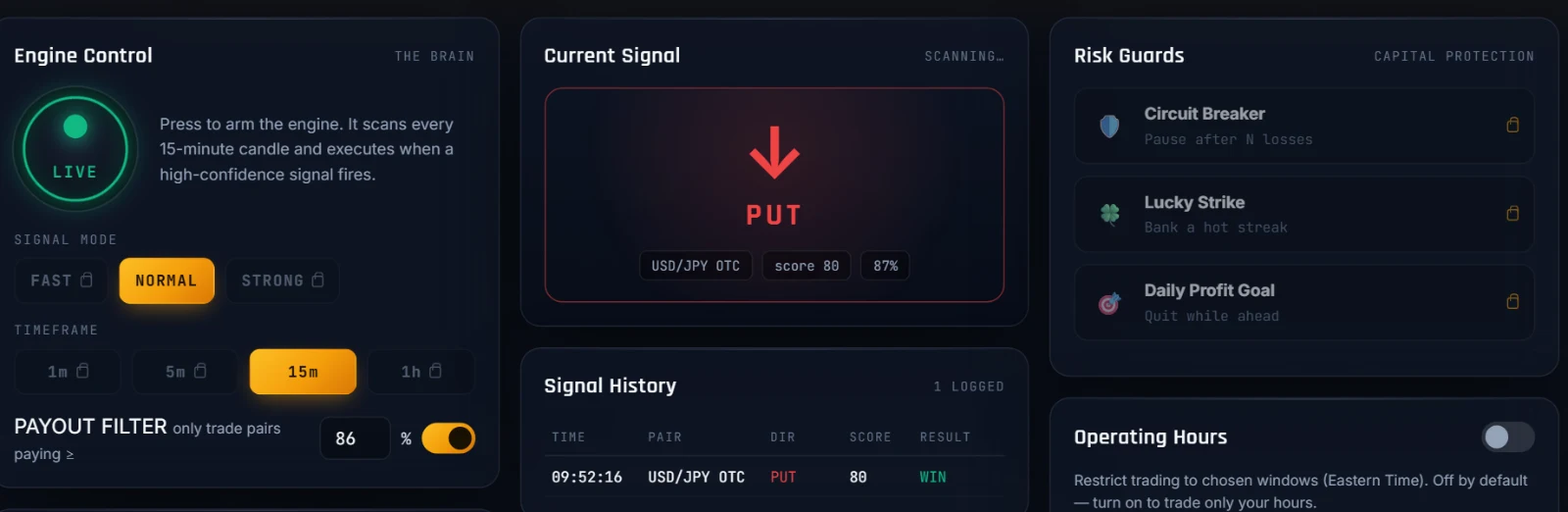 Real screenshot
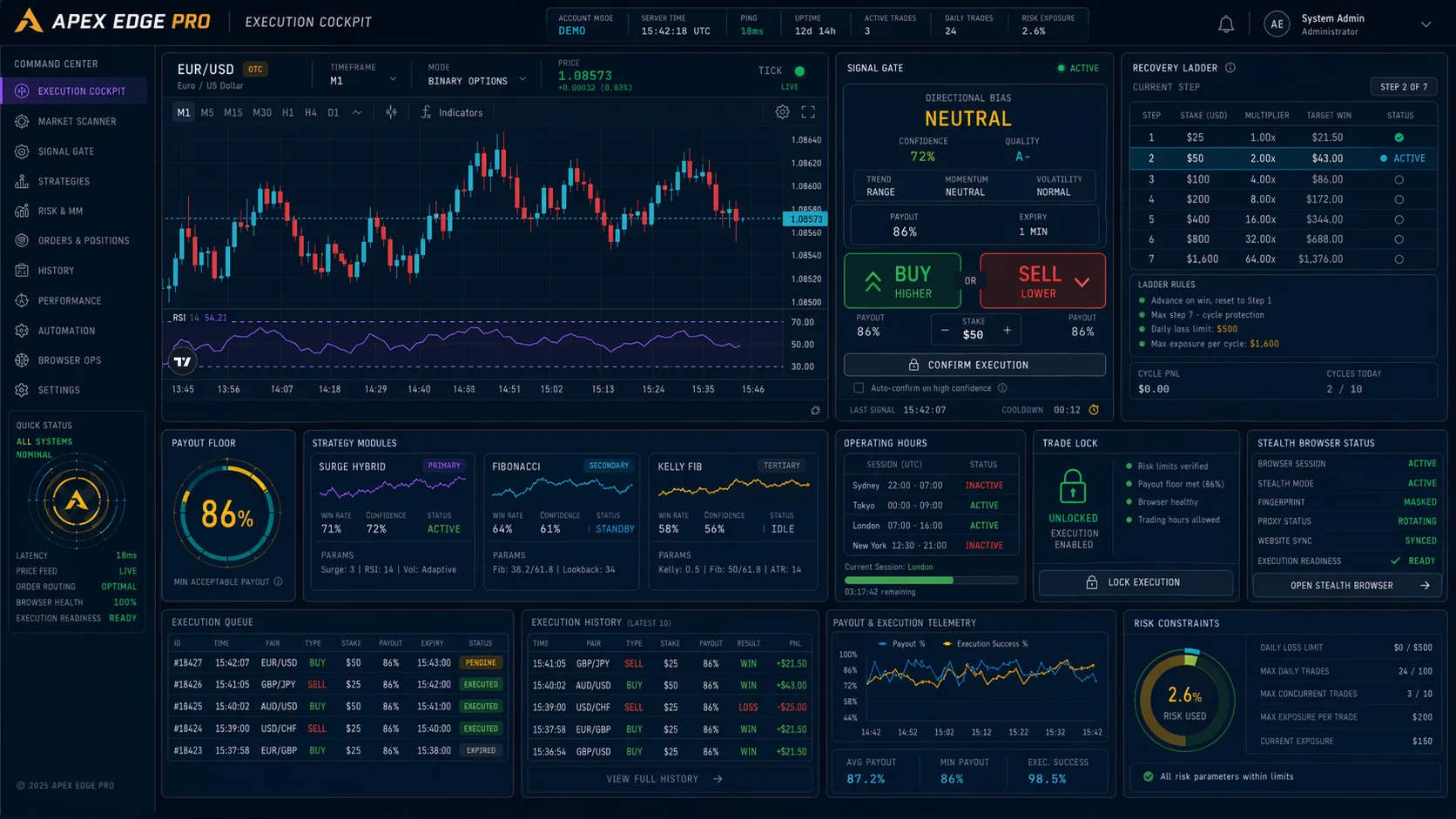 Design concept · figures are illustrative
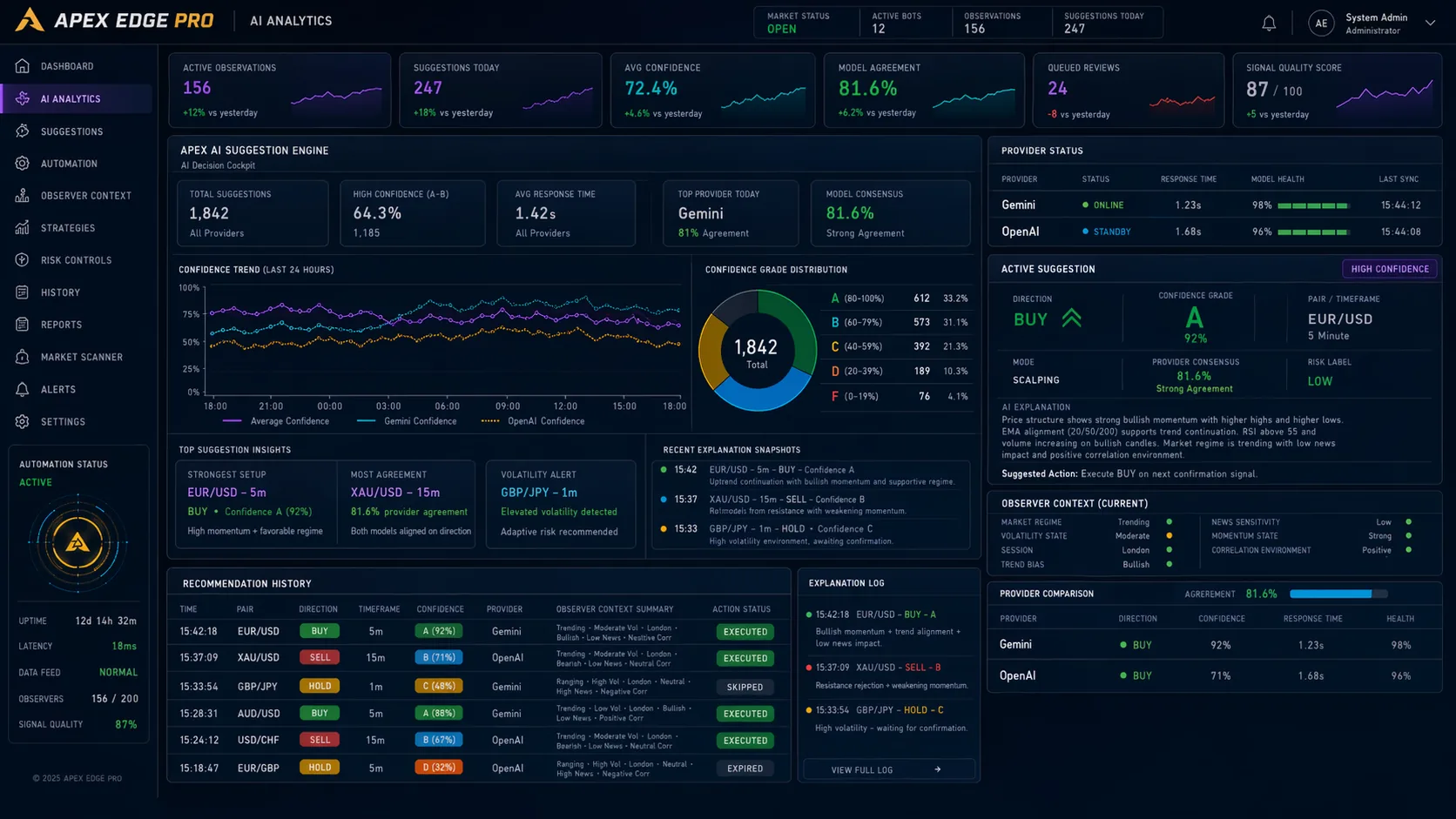 Design concept · figures are illustrative
The value is controlled automation: strategy signals, payout filters, stake sizing, trading hours, human-paced browser actions, and a dashboard that shows you what the bot is doing and why.
Brayden, Jaasiel, MT4 Clone, the Antigravity family, the NextGen set, Masterpiece, Quant Edge, Oracle, BB Reversion and ML Super.
Each signal passes score, age, payout, lock and schedule gates before the browser places your configured trade.
Flat stakes or ten recovery modes, among them SURGE, MAIKER, Fibonacci, Kelly + Fib, Geometric and Payout Recovery, with payout-aware steps and a ladder you can see in full.
Optional analysis through Gemini or OpenAI with your own key: it grades suggestions, tracks how they turned out and never changes a setting on its own.
Minimum payout, adaptive loss guard, circuit breaker, trading hours, stale-signal protection, a trade lock and automatic recovery when the browser stalls.
A real browser with natural cursor paths, varied timing and a saved sign-in, so every session looks like a person at the keyboard.
Not roadmap promises: these ship in the dashboard today, doing the quiet work that protects your balance.
Reach your daily target and it stops risking real money for the rest of the day. Discipline, built in.
Range, candle-body and band-width checks, calibrated per timeframe, that sit out a flat market and let trades through only when price is really moving.
While you trade one pair, it ranks the others by payout and signal quality and tells you where the opportunity moved.
Enter your balance and appetite for risk; it suggests a base stake, shows the whole recovery ladder and warns you before a sequence could outgrow your balance.
A Monday-to-Sunday earnings grid and a profit ledger for each currency pair, practice and real kept apart.
If the browser stalls at 3 a.m., it reloads and signs back in. A broker password you choose to save stays in the Windows password vault, never in a plain file.
APEX EDGE PRO judges whether the next candle is more likely to close higher or lower, then runs the payout, score, schedule and money-management checks before it places a BUY or SELL.
No accuracy is guaranteed. Test on a practice account before using real money.
Signal quality and strategy teamwork are separate dials. Set how strict a signal must be, then how the strategies are allowed to work together.
Require two or more strategies to point the same way before a trade is allowed. Strategies with a stronger recent record count a little more, ML Super adds weight only when its evidence clears your threshold, and you decide whether shared signals open one trade or several.
Trend continuation, reversion, volatility breaks, oscillator snaps, machine-learning and quant scoring, and regime-aware fusion. Each one is named, described and switchable.
Meet every strategyCurrencies, OTC pairs, crypto, commodities, stocks and indices are all selectable, with volatility thresholds calibrated for each kind of market. The strategies are measured on OTC currency pairs; try any other market on the practice balance first.
Bitcoin, Ethereum, Solana, Dogecoin, Cardano, BNB and more.
EUR/USD, GBP/USD, USD/JPY, AUD/USD and their OTC versions, which trade on weekends too.
Gold, silver, Brent and WTI crude, natural gas and platinum.
Apple, Tesla, Microsoft, Amazon, US100, SP500, DJI30 and JPN225.
Regular forex, stocks and indices move on real-world news: central-bank decisions, inflation data, earnings. OTC markets run continuously on the broker's own pricing. Set your trading hours and risk controls for the market you choose.
History and live candles stream straight from the broker into the strategy manager.
Minimum score, signal age, payout floor, teamwork mode, trading hours and locks are all checked.
Your money-management mode calculates the next amount, inside the limits you set.
It syncs pair and timeframe, moves and clicks at a human pace, and records the result.
Recovery modes raise the stake after a loss so that one win covers the losses before it. That only works while your balance lasts. Try your own numbers: this uses the app's own formula.
The app shows this ladder, with your real payout, before it trades, and keeps a reserve you choose. Losing every step loses the total at risk.
| Step | Stake | Lost before this step | Result if it wins |
|---|
Engine settings, schedules, recovery state, AI context, profiles, resets and performance history: visible before a trade and explained after it.
Every plan is the full app on one computer, every strategy and every update while it runs. No subscription renews by itself: when the term ends, buy another term or not.
About $116 a month
The shortest commitment
About $100 a month
Save $97 against two 3-month terms
About $66 a month
Save $591 against four 3-month terms
Savings compared with buying 3 Months at a time.
For the traders who know they are staying. Pay once and keep APEX EDGE PRO for as long as it exists.


Your license works on one computer and cannot be transferred. Sales are final once the license is delivered, except where the law gives you more; see the refund policy.
Create your free account on the download page, then download the Windows installer and sign in to the app with that account. Your 5-day trial starts at your first sign-in in the app.
Go to the downloadSign in once in the broker window the app opens. The session is saved for next time.
No Pocket Option account yet? Create one Partner linkChoose strategies, minimum payout, money-management mode and trading hours, then start on the practice balance.
Planned work, not features you are paying for today. Every plan receives what is added to the app during its term; lifetime receives all of it. Separate services, such as a Telegram signal channel or marketplace presets, may be offered on their own.
Leave the bot running at home and check it from your phone: live status, pause and resume, safe settings and alerts, with no broker password stored on the phone.
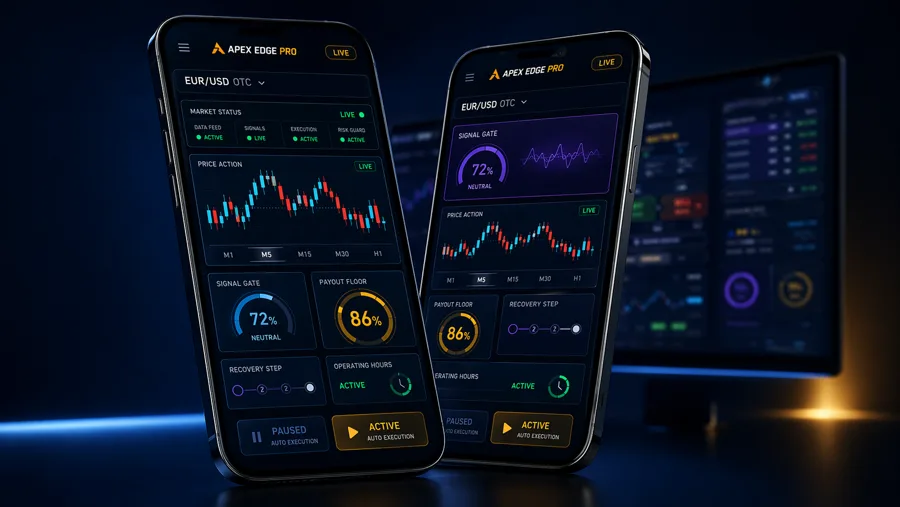
The same engines, guards and account on a second broker.
Build your own rules from indicators like ADX, RSI, moving averages, support and resistance, volatility and candle patterns.
Filtered next-candle signals on Telegram for trading by hand on other platforms.
Ready-made, tuned profiles for Fast, Normal and Strong, so nobody starts from zero.
Separate recommendations for OTC sessions and regular-market sessions, where data and payouts differ.
Strategy presets and setup recipes, offered only once their results support them.
A Windows app that trades on Pocket Option for you. It reads the market with 21 strategy engines, checks every signal against your rules, and places trades in a real browser session on your computer.
No. APEX EDGE PRO is independent software that works with your own Pocket Option account. It is not owned, endorsed or run by Pocket Option.
No. It is automation software, not financial advice, and no past result promises a future one. Binary options are high-risk; start on the practice balance and only trade money you can afford to lose.
A computer with Windows 10 or 11 (64-bit), an internet connection and a Pocket Option account. The installer brings everything else.
Download the app and create an account. The 5-day trial starts at your first sign-in, needs no card, and is limited to one per computer.
No. A license belongs to one account and works on one computer. If you replace your computer, contact support and we move it.
Choose a plan, sign in or create your account, and pay through NOWPayments in crypto. Your plan is added to your account as soon as the payment is confirmed. In the app, press I bought a plan — check now and it unlocks at once.
Licenses are digital, so a sale is final once delivered, except where the law gives you more. If something does not work on your computer, write to support@apexedgepro.com and we will help.
 Your move
5 days, the real engine, no card. Buy a plan only when it has earned its place on your desk.
Trading involves risk. APEX EDGE PRO is automation software, not financial advice. Past results do not guarantee future results.